ProPDF.ai Referrals - Credits for you and your friends
If you like this site and the services it provides, you can become an ambassador to your friends or colleagues and earn credits for the both of you.
In this guide, we'll walk through the entire process from upload to download. No account needed to start. Let's dive in.
Where to find it
Make sure you are logged in first. If you are not, head to propdf.ai — you'll land on the homepage. Log in using link sent to your email.
Once you are logged in, scroll to the bottom of any page and click the "Refer a Friend" link at the bottom.
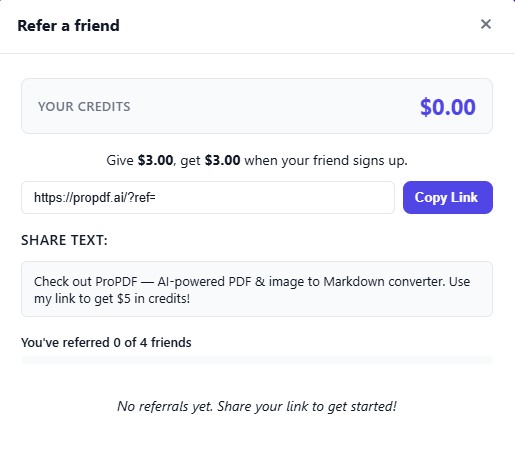
You can see your referal code and stats.
Share your link
Share your custom link! If who you send it to clicks it and logs in themself, you will both recieve the referral bonus credits of $3.00
Please note that you can only refer up to 4 individuals.
Frequently Asked Questions
Why can't I see the refer a friend link?
You need to be logged in to see the referal link. Enter your email and a magic authorization link will be sent to you.
How do I use the credits?
Credits are used up during a checkout automatically. You will see a confirmation to use your credits. What if I don't have enough credits to cover a document purchase?
A split payment will be created where your referal credits are used up and whatever is leftover will be charged as normal. Please keep in mind that our credit card gateway has a minimum of $0.50 charge, so in situations with split payments $0.50 is the minimum in payment charge and the remainder will be deducted from your credits.