What Is Markdown? — The Simple Text Format Powering the Modern Web
You've probably used Markdown without realizing it. Every GitHub README, every Slack message with *bold* or _italic_ text, every Notion page, every Obsidian note — Markdown is everywhere. But what exactly is it, and why has this humble plain-text format become one of the most widely adopted markup languages on the internet?
In this guide, we'll break down what Markdown is, how it works, why its popularity keeps growing, and how it stacks up against other document formats. Whether you're a developer, writer, researcher, or just someone who types things on a computer — Markdown is worth knowing.
What Is Markdown?
Markdown is a lightweight markup language created by John Gruber in 2004, with significant contributions from Aaron Swartz. The idea was simple: create a way to write formatted content using plain text that's easy to read even before it's converted to HTML or another display format.
Unlike HTML, which uses verbose tags like <h1> and <p>, Markdown uses minimal, intuitive syntax:
| What You Want | Markdown Syntax | HTML Equivalent |
|---|---|---|
| Heading | # Heading | <h1>Heading</h1> |
| Bold text | **bold** | <strong>bold</strong> |
| Italic text | *italic* | <em>italic</em> |
| Link | [text](url) | <a href="https://propdf.ai">text</a> |
| List item | - item | <li>item</li> |
| Code block | ```code``` | <pre><code>code</code></pre> |
See the difference? The Markdown version is readable as-is. The HTML isn't. That's the core philosophy: source readability first.
A Brief History
Before Markdown, if you wanted formatted text on the web, you wrote HTML. If you wanted formatted text offline, you used Microsoft Word or another word processor. Neither was ideal for quick, everyday writing:
- HTML is powerful but verbose. Writing
<h2>Section Title</h2>every time you want a heading gets old fast. - Word processors produce binary formats (.docx) that don't play well with version control, diffing, or plain-text tools.
- Other lightweight markup languages existed (reStructuredText, Textile, AsciiDoc) but each had quirks, limited adoption, or steep learning curves.
Gruber's Markdown hit a sweet spot: minimal syntax, human-readable source, one-click conversion to HTML. It spread through the developer community first — blogs, documentation, README files — and then overflowed into mainstream tools.
Why Markdown Use Is Growing
Markdown adoption has exploded in the last decade. Here's why:
1. It's Everywhere
Markdown isn't just for developers anymore. It's built into the tools millions of people use daily:
- GitHub & GitLab — README files, issues, pull request descriptions, wikis
- Slack, Discord, Teams — Message formatting
- Notion — Primary content format under the hood
- Obsidian, Joplin, Typora — Dedicated Markdown note-taking apps
- VS Code — Built-in preview for .md files
- Static site generators — Hugo, Jekyll, Astro, Gatsby all use Markdown for content
- Documentation platforms — ReadMe, Docusaurus, MkDocs
If you use any of these tools, you're already writing Markdown.
2. Plain Text Means Portability
Markdown files are plain text. That means:
- Open them on any device, any OS, any editor — no special software required
- Version control works perfectly — git diff, git blame, merge conflicts are all meaningful
- Search, grep, and script against them with standard text tools
- No vendor lock-in — your content isn't trapped in a proprietary format
A Markdown file written in 2004 opens and looks the same today. Try that with a .doc file from 2004.
3. Content and Presentation Are Separate
Markdown enforces a clean separation between what you wrote and how it looks. You focus on structure and content. The rendering engine handles the visual presentation. Change your site's theme? Your content stays the same. Switch from Jekyll to Hugo? Your .md files move with you.
This is a principle web developers have championed for decades. Markdown makes it effortless.
4. AI and LLMs Speak Markdown
Here's a more recent driver: large language models natively output Markdown. When you ask ChatGPT, Claude, or any modern AI to write an article, generate documentation, or create formatted content — it gives you Markdown. Not HTML. Not Word. Markdown.
Tools like ProPDF that convert PDFs to text also output Markdown by default because it preserves document structure while remaining universally consumable. It's become the lingua franca of AI-generated content.
The Pros and Cons of Markdown
Let's be straight about where Markdown shines and where it falls short.
Pros
- Readable source — The raw text makes sense on its own. No angle brackets or binary blobs.
- Fast to write — Formatting happens as you type, no mouse needed. Writers stay in flow.
- Universal compatibility — Every platform, every language, every tool supports it.
- Version control friendly — Meaningful diffs, clean merges, full history tracking.
- Lightweight — Tiny file sizes, instant to open, no loading spinners.
- No vendor lock-in — Your content is plain text. It outlives any company.
- AI-native — LLMs produce Markdown by default. It's the format of AI-generated content.
- Extensible — Flavors like GitHub Flavored Markdown (GFM) add tables, task lists, and more.
Cons
- Limited formatting — No font control, no precise positioning, no complex layouts. If you need pixel-perfect design, Markdown isn't enough.
- Inconsistent flavors — There's no single "Markdown." GitHub, CommonMark, MultiMarkdown, and others implement slightly different syntaxes. What works on one platform may not render the same on another.
- No standard for advanced features — Tables, footnotes, math notation, and metadata (front matter) are handled differently by different parsers.
- Poor for print — No page breaks, margins, or print-specific controls. You need additional tooling (like Pandoc) to produce print-ready output.
- Learning curve for non-technical users — While simpler than HTML, the syntax still confuses people used to WYSIWYG editors.
- No embedded media — Images are references, not embedded. If the image URL breaks, the image disappears.
Common Markdown Syntax Reference
Here's a quick reference for the syntax you'll use most often:
| Element | Syntax | Result |
|---|---|---|
| Heading 1 | # Heading | Largest heading |
| Heading 2 | ## Heading | Second-level heading |
| Heading 3 | ### Heading | Third-level heading |
| Bold | **text** | text |
| Italic | *text* | text |
| Link | [text](url) | Clickable link |
| Image |  | Embedded image |
| Unordered list | - item | Bulleted list |
| Ordered list | 1. item | Numbered list |
| Inline code | `code` | Styled inline code |
| Code block | ```code``` | Formatted code block |
| Blockquote | > quote | Indented quote block |
| Horizontal rule | --- | Divider line |
| Table | | col | col | | Formatted table |
That's it. Those fifteen elements cover 95% of what you'll ever need.
Markdown in the Wild: Real-World Use Cases
Software Documentation
Every major open-source project on GitHub uses Markdown for READMEs, contributing guides, and wikis. It's the default format for code documentation across the industry.
Technical Blogging
Platforms like Dev.to, Hashnode, and Medium all accept Markdown input. Write once, publish anywhere. No formatting rework when switching platforms.
Personal Knowledge Management
The "second brain" movement — tools like Obsidian, Logseq, and Notion — runs on Markdown. Your notes become a portable, searchable, linkable knowledge base that no single app owns.
PDF Extraction and Conversion
When you extract text from a PDF using tools like ProPDF, Markdown is the default output format because it preserves document structure (headings, lists, tables) while remaining clean and editable. It's the best middle ground between raw text and formatted documents.
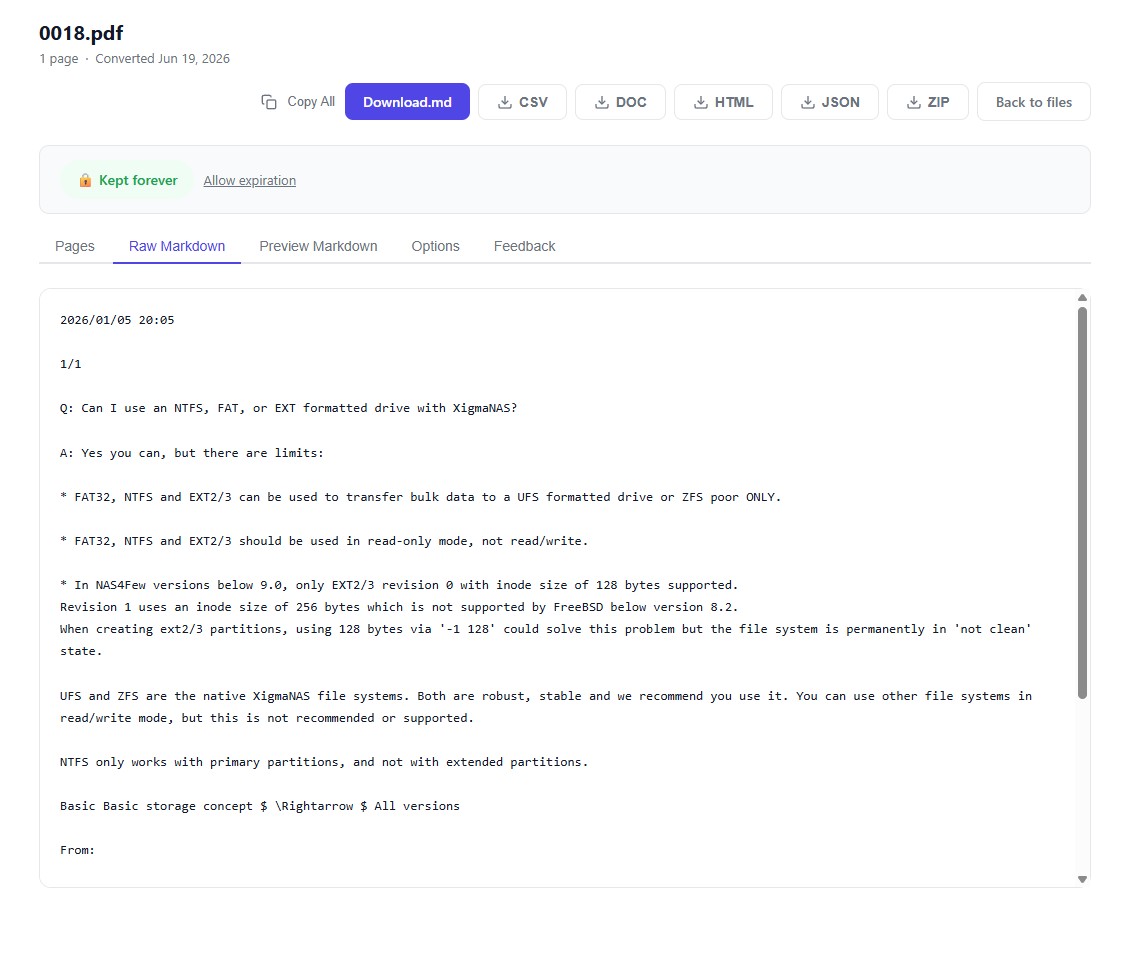
Markdown after OCR processing.
API Documentation
OpenAPI specs, Swagger docs, and developer portals commonly use Markdown for descriptions, examples, and guides alongside structured data.
The Future of Markdown
Markdown isn't going anywhere. If anything, its importance is growing:
- AI adoption — As LLMs become embedded in every workflow, Markdown becomes the default content interchange format.
- Content-as-code — More teams treat content like code: versioned, reviewed, and deployed through CI/CD pipelines. Markdown makes this natural.
- Standardization efforts — CommonMark provides a consistent specification, reducing the fragmentation that plagued early Markdown.
- Rich extensions — MDX (Markdown + JSX) lets you embed interactive React components in Markdown files, bridging the gap between simple text and rich web content.
The trend is clear: the world is moving toward plain-text content that's portable, versionable, and AI-friendly. Markdown is the format that makes all of that work.
Getting Started with Markdown
The best way to learn Markdown is to use it. You already have everything you need:
- Open any text editor (VS Code, Notepad, Nano — anything works)
- Type some content using the syntax from the reference table above
- Save the file with a
.mdextension - Open it in a Markdown previewer (VS Code has one built in, or use an online tool like StackEdit)
Five minutes of writing and you'll have the basics down. An hour and you'll be fluent.
And if you're working with PDFs — extracting content, converting formats, or digitizing documents — ProPDF outputs your extracted text in Markdown by default. Clean, structured, and ready to use.